Moving from VirtFusion to VorticPanel
VorticPanel is a self-hosted KVM VPS control panel. Point an import at VirtFusion's API and it brings your servers, IP addresses and customers across, onto your own packages. A dry run shows what will happen to each server first.
Per node, unlimited VMs
List prices per node per month, October 2026.
On 10 nodes, against VirtFusion
$1,320 a year less
Every license includes resellers, backups, DNS, the API and imports, and paying yearly gets two months free. There's also $4 for nodes with up to 5 VMs and $1 for a node with one.
All pricing →How moving from VirtFusion works
A copied server's original disk stays on the old hypervisor, and an adopted server's original definition is kept. Either can be rolled back.
- 1
Connect
Enter your VirtFusion address and an API token (Settings → API). The import only reads VirtFusion's API.
- 2
Map
Choose which of your packages, node groups and IP pools each VirtFusion package, hypervisor and range becomes.
- 3
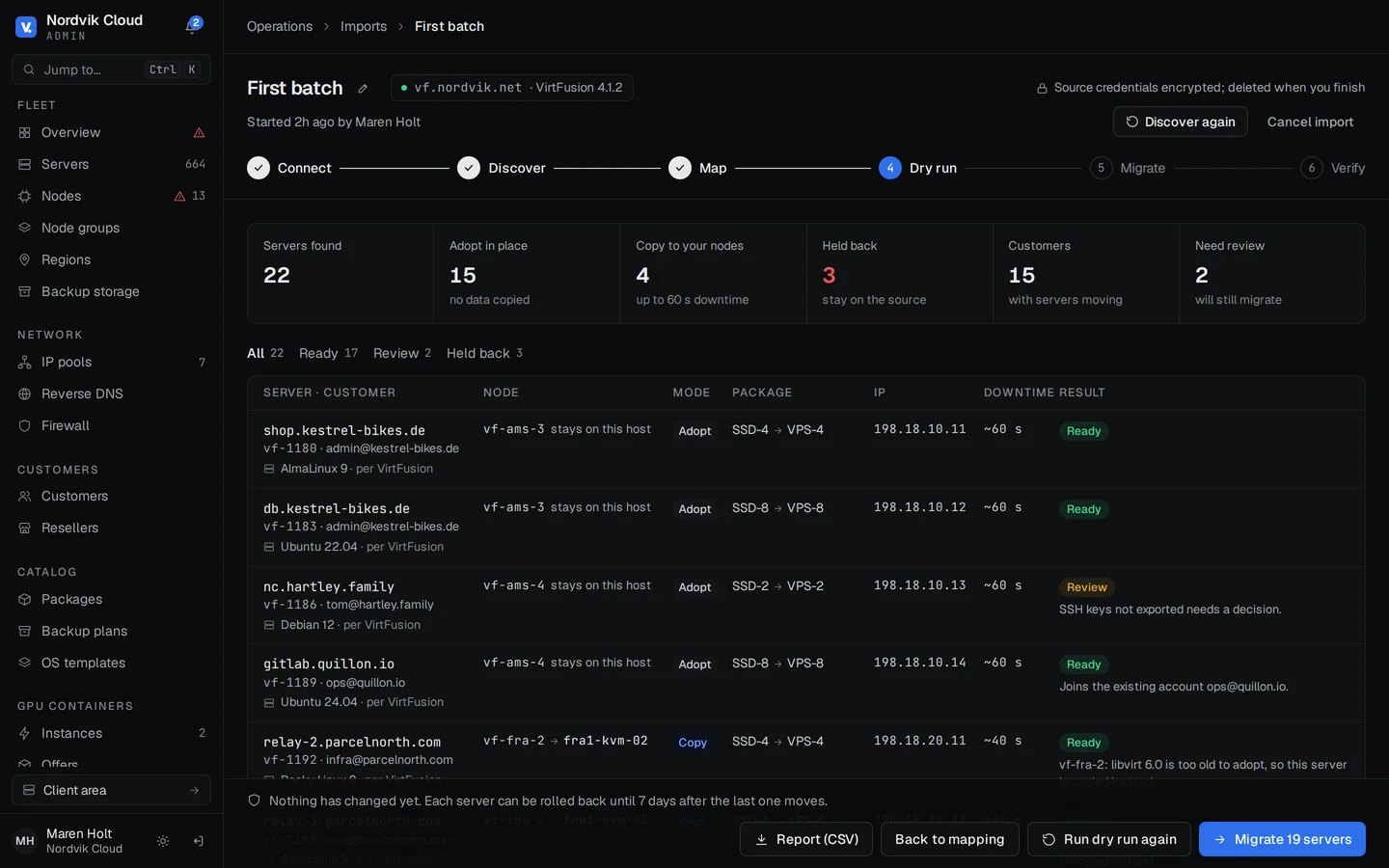
Dry run
Every server is checked from the node that will move it, and anything it can't bring is marked with the reason.
- 4
Move
Copy servers to your nodes, or adopt them where they are. Each one is a job with a live log.
- 5
Check
Each server is checked to run and answer on its address. Roll back any one of them for up to 14 days.
Copy or adopt
| Copy | Adopt | |
|---|---|---|
| Ends up | On one of your nodes | On the same machine, now one of your nodes |
| Needs | SSH as root from your node to the VirtFusion hypervisor | The agent installed on the VirtFusion hypervisor |
| Downtime | A last pass of what changed, after copying while it runs | One restart |
| Rollback | The copy goes and the original starts again | The original definition is put back |
- Saved before it stops
- VirtFusion keeps a server's definition in libvirt only while it runs. The import saves each one before shutting the server down, and creates it again, running, if you roll back.
- Adopt in place
- Install the agent on a VirtFusion hypervisor and it becomes one of your nodes. Disks in /home/vf-data/disk stay where they are, and each server restarts once. VirtFusion's cloud-init drive stays behind.
- Removing VirtFusion
- The panel stops VirtFusion's services and containers, takes out its cron jobs and the control server's SSH key, and moves /opt/virtfusion aside. /home/vf-data is left alone. If a server stops or a bridge goes, everything is put back.
What you get once you're over
- Nodes connect out
- Agents connect out to the controller over HTTPS, and consoles, jobs and stats travel over those connections.
- Moves between nodes
- Live, with a brief pause to switch over, or with one restart where live can't work, such as between Intel and AMD nodes. Emptying a node moves its servers off two at a time.
- Resellers under their brand
- Quotas, packages and locations per reseller, with their own customers, brand and billing link.
- WHMCS and Blesta modules, and an API for the rest
- The modules create, suspend, unsuspend, terminate and upgrade servers. Other billing panels make the same API calls, with idempotency keys and signed webhooks.
- Encrypted backups off the node
- Full or incremental, deduplicated, to S3 or SFTP. Customers restore their own.
- Customer self-service
- Console, reinstall, firewall, reverse DNS, DNS hosting and team access.
Questions about moving from VirtFusion
Do servers need to be running?
No. A switched-off server is read from VirtFusion's own copy of its definition, copied while it's off, and left off on your node. A suspended one stays suspended.
How much downtime does a copy cause?
The disk is copied while the server runs, and it's shut down only for a last pass of what changed. Without Python on the hypervisor, which the copying node installs when it can, the server is shut down first and the whole disk copied. Each server's estimate is on the dry run, and adopting costs one restart.
Do my customers keep their IP addresses?
VirtFusion's IP blocks come across as pools of your own, or join ones you have. A server keeps its addresses when it's adopted, or copied to a node its range is routed to. Otherwise it gets new ones from its new node, set inside the server through its guest agent.
What doesn't come across?
qcow2 disks that read a backing file, until they're flattened, and servers with more than 9 disks (the cloud-init drive doesn't count). They stay on VirtFusion, and the dry run lists each one with the reason. A server that moves leaves behind its snapshots, backups, firewall rules, TPM, private networks and the other users it was shared with; the dry run names the ones that had firewall rules.
Can I undo it?
Yes, one server at a time, for 3, 7 or 14 days after the last server moves. A copied server's disk stays on the VirtFusion hypervisor, and rolling back deletes the copy and starts the original from its saved definition.