Sell your GPUs as containers or in servers.
Rent out whole NVIDIA cards in containers that are ready over SSH or JupyterLab once their image is pulled, billed by the hour. Or pass a card of any make through to a KVM server, and the customer gets a whole virtual machine with a real GPU in it.
- Cards
- Whole cards: NVIDIA in containers, any make in servers
- Reached by
- SSH, JupyterLab or the image's own ports
- Billed
- By the hour through WHMCS, or as packages in WHMCS or Blesta
- Isolated
- User namespaces, disk limits and a network guard
- Cards
- 1× NVIDIA GeForce RTX 4090
- vCPU
- 16
- Memory
- 64 GB
- /workspace
- 200 GB, kept across images
- Container disk
- 50 GB
- Network
- 10 forwarded ports
- Locations
- Frankfurt GPU
- Own images
- Allowed, up to 30 GB
# nvidia-smi -L
GPU 0: NVIDIA GeForce RTX 4090
# python -c "import torch; \
  print(torch.cuda.is_available())"
True
What it does
- Images to rent
- A new panel starts with CUDA on Ubuntu, PyTorch, TensorFlow with Jupyter, vLLM and Ollama. Add any Docker image, from Docker Hub or your own registry, or let an offer take the customer's own.
- Offers
- An offer sets the cards, vCPU, memory, /workspace and container disk, and where it's sold. The offers list shows how many more fit in each location.
- Image chosen later
- Sell an instance without an image and the customer picks one when they first open it, from those its offer allows. Its cards are held for it from the start.
- Ports or an address
- Forwarded ports on the host's public address: SSH and Jupyter when the image has them, then the image's own. Or an IPv4 address of its own from an IP pool.
- A /workspace that stays
- Each instance's /workspace is its own filesystem of its own size. It's kept through a change of image, and everything else starts afresh.
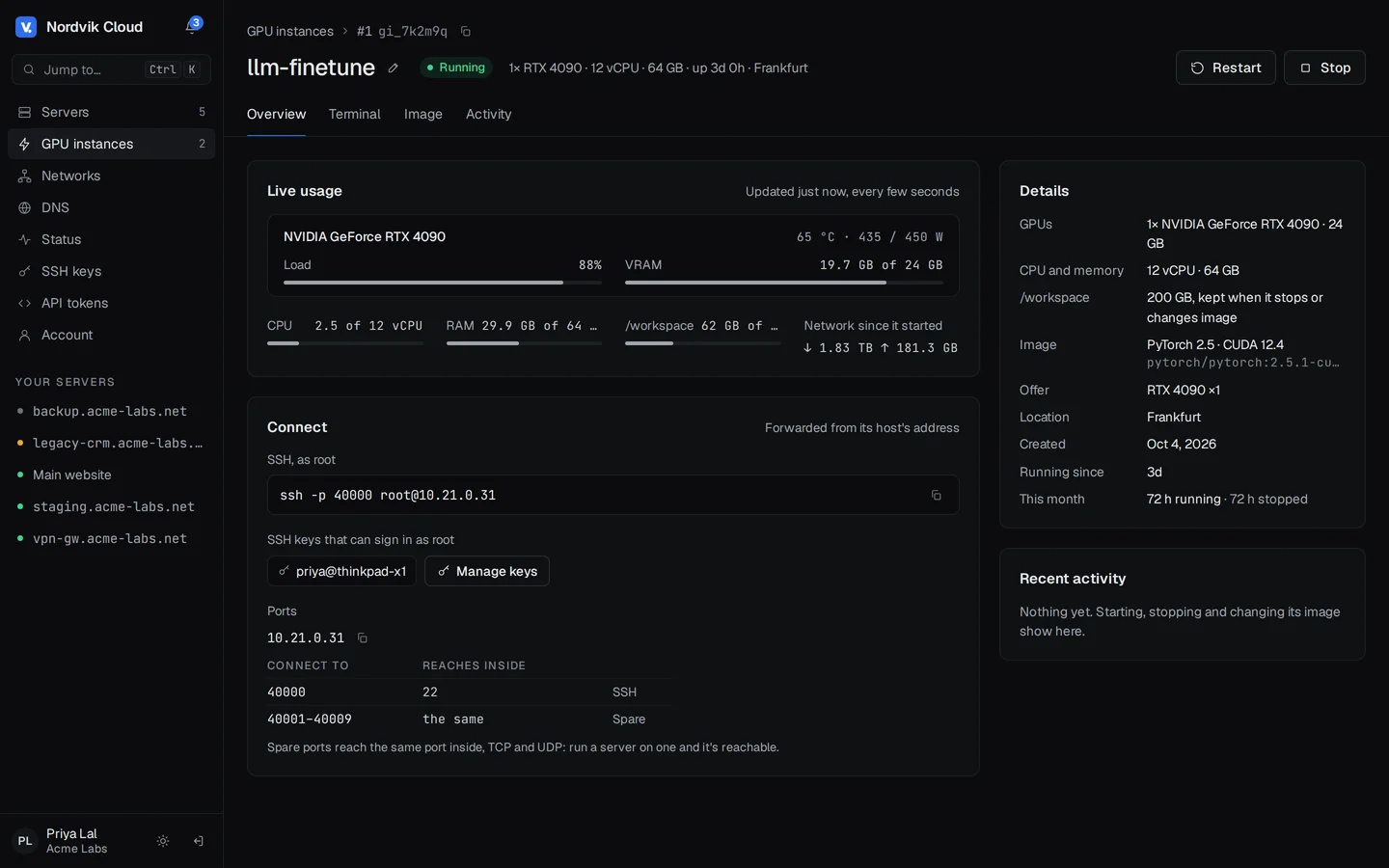
- Live usage
- Each card's load, memory, temperature and power from nvidia-smi, with CPU, memory and network, on the instance's page.
GPU containers or GPU servers
A node is one or the other, and you can run both kinds side by side. Either kind takes one license slot.
| GPU container host | KVM node | |
|---|---|---|
| Runs | Customers' GPU containers on Docker | Servers from your packages and OS templates, with cards passed through |
| Its cards | NVIDIA, on the NVIDIA driver; each instance gets whole cards by their ID | Any make; each goes to one server whole, through vfio-pci |
| The customer gets | A container with SSH, JupyterLab and their /workspace | A whole virtual machine, any operating system, with the card's own driver |
| Needs | NVIDIA cards, with no virtualization or IOMMU | VT-x or AMD-V, and IOMMU for cards |
| Network | Forwarded ports on the host's address, or an IPv4 address per instance | The public bridge and IP pools |
| Ready in | As long as the image takes to pull | As long as the server takes to boot |
Setting it up
- 1
Enroll the host
Choose GPU containers under What it runs, and run the command it gives. It installs the NVIDIA driver, Docker and the container toolkit.
- 2
Switch the cards on
On the host's Assets tab, let containers use each card you rent out.
- 3
Make an offer
Its cards, CPU, memory, /workspace and locations, and the images it can run.
- 4
Sell it
Pick the offer as a WHMCS product's package, and price GPU hours under Metric Billing.
Questions
- GPU servers →
Passing cards through to servers, and selling them from a package
- GPU containers →
Images, offers, instances and how they're isolated
- Adding a GPU container host →
What the machine needs, and the one command
- WHMCS: GPU instances →
Products, hourly billing and paying from credit
- Billing API: GPU instances →
Creating instances and reading their hours
Which NVIDIA cards work?
Cards from Turing on (RTX 20 and newer, T4, A-series, L4, L40S, H100) on NVIDIA's open driver, and GTX 10, Tesla P100 and V100 on its closed driver. The host runs Ubuntu 22.04 or 24.04, Debian 12, or AlmaLinux or Rocky Linux 9.
Are cards shared between customers?
No. Each instance gets whole cards by their NVIDIA ID, and keeps them while it's stopped or suspended. They're freed when it's deleted.
How do I stop customers running up hours they never pay for?
Turn on Pay from credit on the WHMCS product. An instance starts only when the client's credit covers the hours you set, and it's suspended when the credit runs out. After Time out of credit (a week unless you change it) it's terminated and its cards are free again.
Is a container as isolated as a virtual machine?
No. Containers share the host's kernel. Instances run without privileges, in user namespaces, with their own disk limits and with your internal networks blocked, but rent hosts only to customers you'd sell a server to. For a virtual machine with a card, give the card to a KVM server instead.
How do I sell a server with a GPU?
Turn on IOMMU on a KVM node, switch its cards on for servers on its Assets tab, and give a package GPUs: how many per server, and which model. Sell that package from WHMCS or Blesta like any other, and each server gets its cards as it's made, Windows included. A card can also be given to one server from its Hardware tab.
Which cards can go to servers?
Any graphics card the node has, NVIDIA, AMD or Intel, consumer or data center. It goes to one server whole, along with any other device in its IOMMU group. Cards that can be split (vGPU, MIG, SR-IOV) are passed through whole too.
What does a GPU host cost to license?
One node license, like any other node: $7 a month for as many instances as its cards allow.
Can resellers sell them?
Yes. Pick the offers a reseller may sell and give them a quota of cards. They create instances for their own customers over the API or in the panel, and bill them their own way.